Help for DVD Audio Ripper
Tips before you use OJOsoft DVD Audio Ripper
Download OJOsoft DVD Audio Ripper
Download OJOsoft DVD Audio Ripper first and learn how to get the newest version of OJOsoft DVD Audio Ripper.
Install OJOsoft DVD Audio Ripper
See how to install OJOsoft DVD Audio Ripper. Here you can find the solution to the problem you met during installation and also how to uninstall OJOsoft products.
Purchase OJOsoft DVD Audio Ripper
The DVD Audio Ripper you free download is a trial version and with which you can only convert 20% of your video. You can purchase OJOsoft DVD Audio Ripper to remove the limitation. If you want to use coupon code when you buy the DVD Audio Ripper, please see how to use coupon code.
Activate OJOsoft DVD Audio Ripper
After you bought OJOsoft DVD Audio Ripper, you will get a purchase email including a license code. You can activate the DVD Audio Ripper with your license code. See how to activate OJOsoft DVD Audio Ripper.
Getting started with OJOsoft DVD Audio Ripper
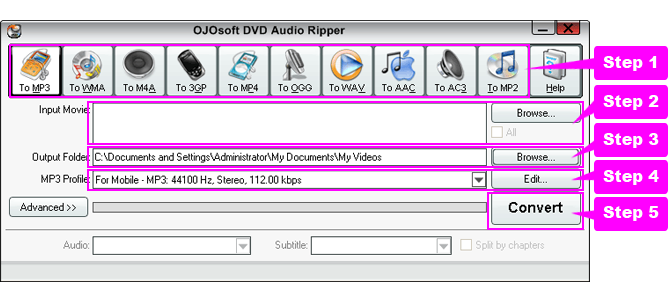
- Step 1: Select the necessary output video format
- Step 2: Click Browse… button to open input DVD file, DVD-Video folder, or IFO files
- Step 3: If necessary, edit the output file name or click Browse… button for choosing output folder
- Step 4: Click the drop-down list to select a preset profile or click Edit… button to customize the profile
- Step 5: Click Convert button to start DVD ripping and converting
More help for DVD Audio Ripper
Interface of DVD Audio Ripper tells you more about how to use DVD Audio Ripper.
Learn how to select the Main Movie in the DVD to Convert and how to select DVD audio track and subtitle.
For more help, you can contact our support team with support@ojosoft.com. Having any problems concerning conversion with the software, please read How to get technical support efficiently first and send an email including requested information to us.
Help for related Converters
- Help for WAV to MP3 Converter
- Help for MP4 Converter
- Help for DVD to 3GP Converter
- Help for iPhone Video Converter
- Help for M4A to MP3 Converter
- Help for WMV Converter
- Help for iPod Video Converter
- Help for AVI Converter
- Help for DVD Ripper
- Help for DVD to PSP Converter
Functions of Some Converters
- M2TS to AVI
- MP4 Audio Converter
- Convert SWF to FLV
- Convert YouTube to MPG
- 3GP Audio Converter
- FLAC Converter
- DVR-MS Converter
- 3G2 Converter
- Convert MP4 to MKV
- H.263 Converter
- AVCHD file converter
- RMVB to AVI Converter
- H.264/MPEG-4 AVC Converter
- H.264 Converter
- M4V Converter
- MJPEG Converter
- XviD Converter
- MTS Converter
- WMV to MPEG4 Converter
- FLAC to MP3 Converter
- AVI DVD to Cowon J3 conversion
© OJOsoft Corporation All Rights Reserved.