WMA Converter
Convert WMA to audio and convert audio to WMA
OJOsoft WMA Converter
-
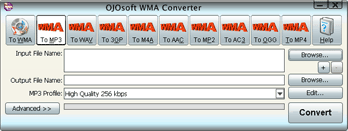 Click image to enlarge
About OJOsoft WMA Converter
OJOsoft WMA Converter supports converting WMA to audio files,such as MP3, MP2, M4A, MP4(audio only), AAC, AC3, WAV, 3GP.
Also, it provides an easy way to convert to WMA from many popular video and audio files.
Free download OJOsoft WMA Converter to have your wonderful digital life right now!
OJOsoft WMA Converter Supports all the key formats!
Supported Source File Formats to WMA format
|
|
|||||||||||||||||||||
|
|||||||||||||||||||||
|
|
|||||||||||||||||||||
Supported Target File Formats from WMA format
|
|
|||||||||||||||||||||
|
|||||||||||||||||||||
|
|
|||||||||||||||||||||
What can OJOsoft WMA Converter do for you?
Video to WMA Converter
It gives you the best way to convert to WMA format from video files.
Audio to WMA Converter
The best WMA converter can convert to WMA from almost all audio formats.
WMA to Audio Converter
An outstanding audio converter to convert WMA to almost all audio formats.
Convert WMA to MP3
Enjoy your MP3 files on your portable MP3 player by converting WMA to MP3.
MP3 to WMA Converter
An easy way to convert to WMA from MP3.
Convert to WAV from WMA
A professional audio converter to convert WMA to WAV.
AVI to WMA Converter
OJOsoft WMA converter can also be used as AVI to WMA converter to convert AVI to WMA
Convert to WMA from MP4
Easily and efficiently convert to WMA from MP4 video.
Features of OJOsoft WMA Converter
- Support converting many popular video and audio formats to WMA
- Support batch conversion with a task list
- Support converting WMA to audio files,such as MP3, MP2, M4A, MP4(audio only), AAC, AC3, WAV, 3GP
- Unmatchable converting speed, wonderful output quality
- Windows Vista supported
- Have option to select bit rate,audio codec, sample rate etc
- So easy to modify the name and path of output files
- When converting files, you can pause, stop and continue at any moment
- With the user- friendly interface, OJOsoft WMA Converter is suited for both veterans and beginners you can complete your conversion as easy as 1-2-3
- All decoders and encoders are built in. Once you download and install OJOsoft WMA Converter, all supported formats can be converted without downloading any more codec
- Safe to install and viruses-free. We respect your privacy. So there are no spyware and adware in OJOsoft WMA Converter
System Requirements for OJOsoft WMA Converter
Minimum System Requirements
OS : Microsoft Windows XP
RAM : 128M
CPU : Intel/AMD compatible at 750 MHz or above
Recommended System Requirements
OS : Microsoft Windows 7/XP/2003/Vista with all latest updates installed
RAM : 512M or higher
CPU : Intel/AMD compatible at 750 MHz or above
Online help or tutorials
- FAQs for general tech questions
- FAQs for OJOsoft WMA Converter
- Getting started with OJOsoft WMA Converter
- Interface of OJOsoft WMA Converter
Related Products to WMA converter
OJOsoft Audio Converter
It offers you the best way to convert audio files from one format to another and support almost any audio format.
OJOsoft DVD Audio Ripper
It offers you the best way to rip and convert your favorite DVD files to audio formats.
OJOsoft MP3 Converter
The best MP3 converter all over the world can convert video and audio files to MP3/MP2 easy and fast.
OJOsoft MP4 to MP3 Converter
The professional MP4 to MP3 conversion tool can convert MP4 files to MP3/MP2 format easy and fast.
OJOsoft MP3 to WAV Converter
It supports converting MP3 to WAV format and converting MP3 files to MP2 format.
OJOsoft M4A to MP3 Converter
Convert M4A files to MP3/MP2 format.
OJOsoft WAV to MP3 converter
It is the best tool to convert WAV file to MP3, MP2 and MP4 (audio only).
OJOsoft WMA to MP3 Converter
It helps you convert WMA to MP3, MP2 and MP4 (audio only) with super fast speed and great quality.
OJOsoft M4A Converter
This M4A file converter can convert M4A files to MP3, MP2, WMA, AAC, AC3, WAV and convert audio files to M4A, AAC.
OJOsoft WAV Converter
Free download WAV converter can help you convert many popular audio files to WAV format and convert WAV files to other audio formats, such as MP3, WMA, M4A, AAC, AC3, MP2, OGG etc.
OJOsoft HD Video Converter
OJOsoft HD Video Converter can convert video files from HD video to SD video while from SD video to HD video.